
How Sintra helps you spend money smarter
When you get paid and have all your money, it’s easy to get carried away. You want to buy everything and feel like you can afford it all. A few weeks later, though, you might find there’s no money left even for important expenses — and saving still didn’t happen.
A budget can fix that. It protects what matters, helps you plan ahead, and shows exactly how much you can spend without stress.
Unfortunately, many budgeting services are too complicated. They make you feel like an accountant — and almost nobody wants that. That’s why we created a service that makes managing your money simple and enjoyable.

Think ahead
Seeing exactly how much you spent in each category can be interesting, but it’s rarely truly helpful. Instead of showing where your money went, Sintra helps you understand what you can afford — ahead of time, not after the money is gone.
It’s not that important to know how much you spend on coffee in a month. What matters is that it fits into your daily budget and doesn’t get in the way of your goals or essential needs.
Know your daily budget
Based on your income and planned expenses, Sintra calculates your daily budget. It helps you see exactly how much money you have each day:
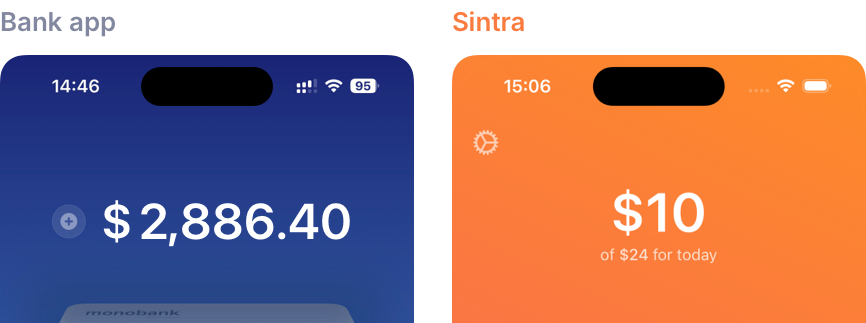
You can spend money from the daily budget on anything — no need to sort it into categories. This makes adding expenses much faster. The key is not to spend more than Sintra shows.
The daily budget is constantly recalculated. Money you don’t spend today is carried over to tomorrow and added to the new daily budget. And vice versa: if you overspend today, tomorrow’s budget will be smaller.
Suppose your initial daily budget is $25:
- Spend $20 today, and you’ll have $5 left. Tomorrow’s budget is $30 ($5 + $25).
- Spend $35, and you’ll have −$10. Tomorrow’s budget is $15 (−$10 + $25).
To keep your daily balance up to date, record all expenses — on the website or in our iOS app.
Plan mandatory expenses
Sintra has Planned Expenses — for things you know you’ll need to pay for: rent, subscriptions, gifts, fuel, groceries. They also cover your commitments and savings — whether you’re paying off a loan, saving for a big purchase, or building up an emergency fund.
Sintra helps you keep these expenses safe. When creating a budget, you can assign each category to its own “envelope”:
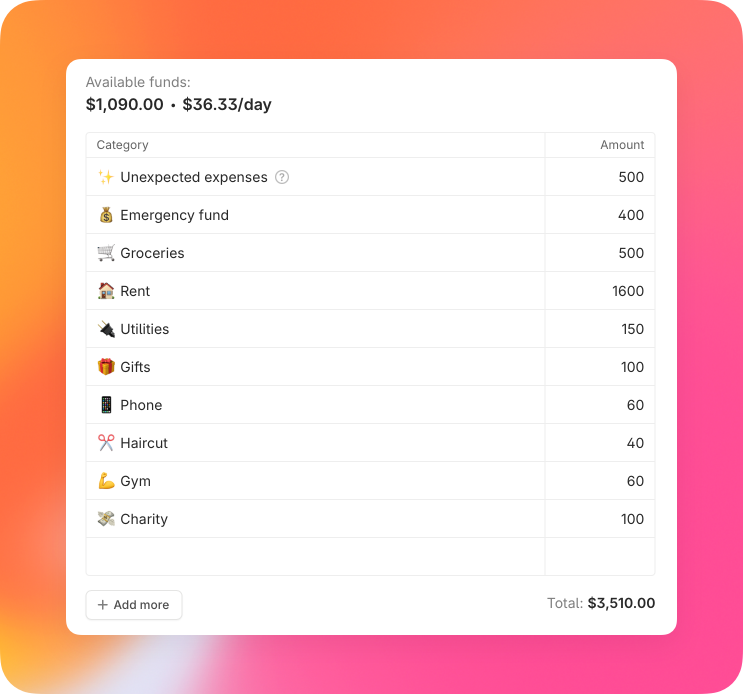
All money not set aside for planned expenses goes straight into your daily budget.
Use clear, specific category names. This makes planning your expenses simpler and more accurate:
| Bank statement | Sintra |
|---|---|
|
|
|
|
|
|
|
|
A few tips
- Record all expenses. This helps you spend mindfully and gives you a clear picture of your actual available money.
- Keep an eye on your balance. In the Income section, you can see how much money is left in your budget. Compare this balance with reality a few times a month — if you forgot to add an expense, the numbers won’t match and your budget won’t reflect the actual situation.
- Adjust your budget. Sometimes you’ll spend more than planned. That’s perfectly normal, and in fact it happens quite often in everyday life. Just update your budget to reflect the changes. With Sintra, it’s easy to cover overspending in a category or make quick adjustments.
We couldn’t find a simple service to manage money the right way — so we built one ourselves.
Budgeting doesn’t have to be complicated — it can bring clarity and peace of mind. Discover how easy it can be with Sintra.